Review and debate
Have your other coding agents review a branch or settle a question together, then hand what they agreed on back to the agent at work.
The agents you installed can check each other’s work. A cross-review has them read a branch and argue over what they find; a debate puts one question to them and lets the majority decide. They read a copy of the repository and can’t change anything. Each one runs on its own subscription, with the model you pick for it.
From a session
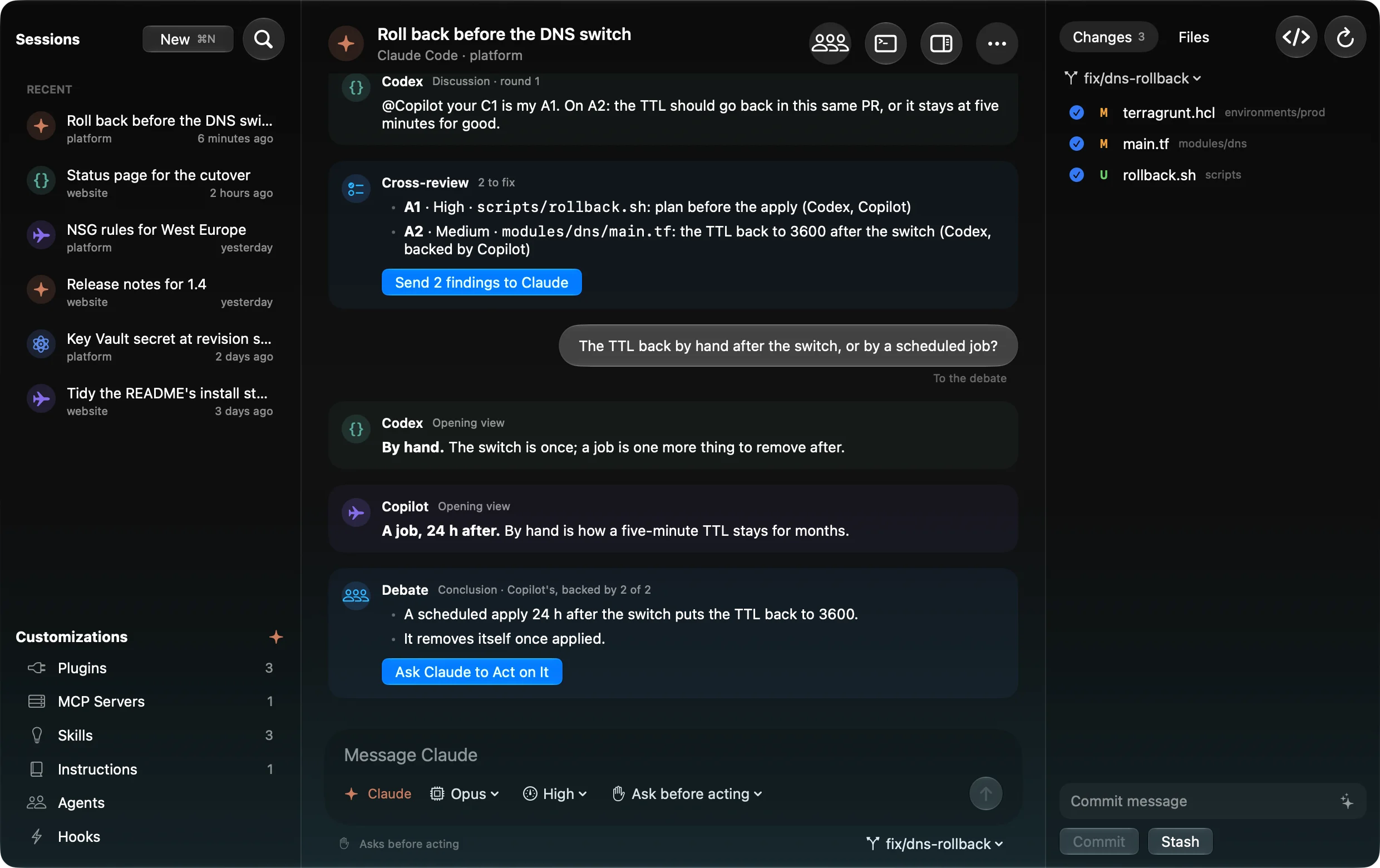
In Emsai Agents, the header’s ⁂ menu (three people) offers:
- Cross-Review This Branch: the other agents review the session’s work.
- Debate a Question…: the message field takes your question. If you already typed it, the item reads Debate What I Wrote.
A card in the conversation then asks who takes part, each with its model (+ adds the same agent again with another model), and for a review, what the branch is Compared with. Two switches for a review: Let them debate their findings and A devil’s advocate challenges the approach; for a debate, Let them discuss before they conclude. Start Review (or Start Debate) or Cancel.
The other agents are told the session’s latest exchanges, and their words come into the conversation as they go: findings, discussion and verdicts, or each one’s view, rounds, proposals and votes. While they discuss, what you type goes to them (heard at their next round); switch the field back to talk to the session’s agent.
Nothing reaches the session’s agent until you send it. At the end:
- Send N findings to … hands the review’s kept findings to the agent; the reviewers then check its answer and fixes, and their checks appear in the conversation too.
- Ask … to Act on It hands it the debate’s conclusion.
Cross-Review Branch, on its own
The Cross-Review Branch action (Spotlight or ⌃⌥O) opens the review window for any repository. When an agent’s turn ends in a repository, its island message also has a Review button.
- Pick a repository. The window shows the change: the branch against the default branch, uncommitted changes and new files included. Compared with picks another base: the branch it started from, its own pushed copy (only what isn’t pushed), or the last commit (only what isn’t committed).
- Pick the reviewers, each with a model. The agent that wrote the branch is left unchecked. Your lineup is remembered.
- Round 1, the review. Each reviewer reads the change and lists findings: severity, file and line, what goes wrong.
- The debate (Let them debate, two reviewers or more). Either Rounds (each one checks the others’ findings, then whoever is contradicted keeps or withdraws) or Discussion (up to three rounds where they answer each other, and you can have your say; Wait for Me holds the next round until Go On).
A devil’s advocate (on by default): one reviewer, of another agent than the author’s, also challenges the approach — the design, a simpler way, what’s missing. Its findings are marked Design. Reviewers are told to assume a finding is wrong until the code proves it, and the window shows the agreement rate.
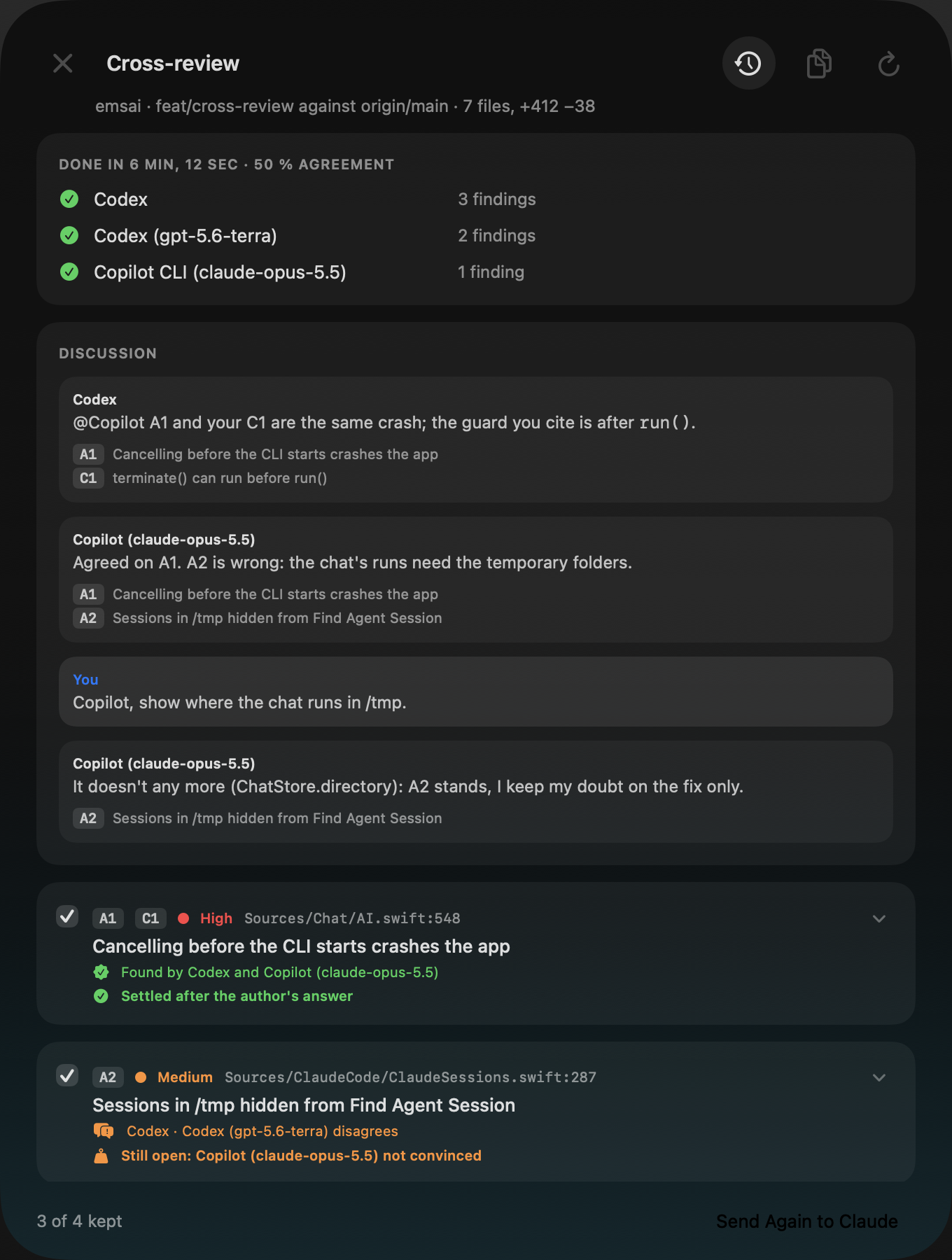
The issues come out grouped (one problem found by two is one issue), the most serious first: confirmed, disputed, only one (nobody confirmed it) and withdrawn. Unfold one to see what each agent said. A slow reviewer can be skipped with Skip.
Esc only hides the window: the review goes on, the island tells you when it’s done, and Cross-Review Branch brings it back. The clock button lists past reviews.
Hand the findings to the author
Tick the issues to keep, pick a session next to Send (the author’s session first, any other open in that repository whatever its agent, or a new session of an installed agent), then Send. The findings go in a note inside the repository, never committed, and the session gets one line pointing to it.
Then there’s nothing for you to do. When the author’s turn ends, the reviewers read its answer and what its code changed, and mark each issue settled (fixed, or rejected for a reason the code proves) or still open. What’s still open goes back to the author once more. After that, the island tells you: all settled, or “your call” with both sides under each open issue. Send Again sends only what’s still open; Stop ends the loop. The copy button gives the findings as Markdown.
Debate in Repo
One question about a repository — “keep the script or go through the window?”, a diagnosis, a design choice. Debate in Repo (Spotlight or ⌃⌥O), then the repository.
- The question and who takes part, each with its model.
- Each one’s view, alone, from reading a copy of the repository.
- The discussion (Let them discuss): up to three rounds where they answer each other. You can speak too, heard at the next round.
- The majority decides. Each one proposes a conclusion, then approves every proposal it can stand behind and names its first choice. The most approved wins; you see who approved it, why the others didn’t, and the other proposals.
Send hands the debate to a session open in that repository, or to a new one; Copy gives it as Markdown.
Asked by a session. With Emsai’s plugin installed for Claude Code (Settings › Coding Agents), you can ask it “ask Copilot what it thinks” or ask for a debate: it writes the question, and the other agent’s answer comes back to it, or the debate window opens with the question ready.
APIs as reviewers
Besides the coding agents, the AI providers set up in Settings › AI Models can review and debate: OpenAI-compatible endpoints (LM Studio, Ollama…), Anthropic with a key, and Apple’s model on this Mac. They’re off until you check them. They read the code through read-only tools Emsai runs inside the review’s copy, and a key or password in what they read is left out. What leaves your Mac is the code they read: pick a model running on this Mac to keep it here. The model has to support tool calls; Apple’s model, too small for that, only gets the diff.
Good to know
- Reviewers and debaters only read a copy: they never touch your folder.
- Their runs don’t show as your sessions, in the island or in Find Agent Session.
- Some agents take several minutes a round; a reviewer taking more than 20 minutes is let go, the others carry on.
- The last review and the last debate are kept after a restart: their action offers “Back to the review of …” or “Back to the debate on …”.