Agents’ usage
See how much of each coding agent’s plan is left, where it’s heading, and get warned before you hit a limit.
Emsai reads the real limits of the coding agents you use — Claude Code, Codex, Copilot CLI, Antigravity CLI — and shows them where you already look: the menu bar, the island, Spotlight and the chat. No prompt is sent just to measure them, and reading anything that needs your login is opt-in.
In the menu bar
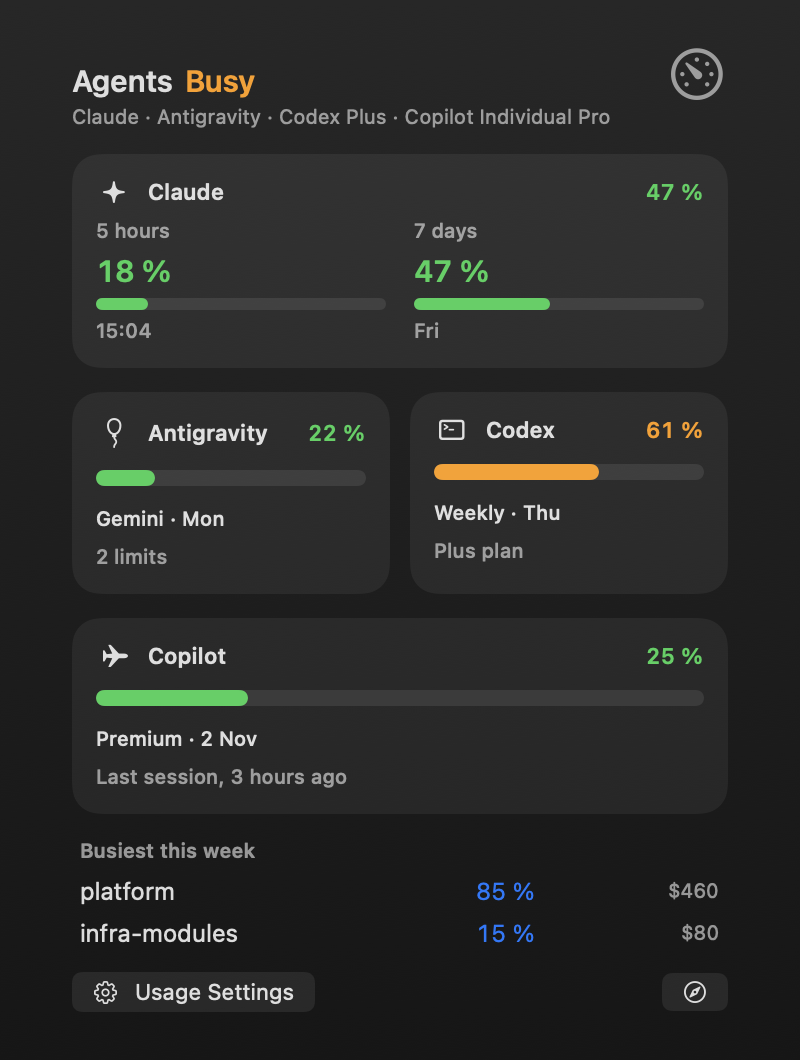
A ring with a percentage sits in the menu bar. Hover or click it for the details:
- A header saying how it goes, from your most used limit: Good, Busy past 60 %, Near limit past 85 %, with each agent’s plan.
- Claude’s card: its 5-hour and 7-day windows side by side (and its weekly model limit when your plan has one), each with its reset.
- A tile per other agent: its most used limit, its bar and its reset.
- Busiest this week: the projects that used the most, with their share and an estimated cost.
- Usage Settings, and a button to Claude’s usage page.
Click a card to unfold it: each limit in full, its reset, a forecast at the current pace (when it reaches 100 %, in orange, or how full it will be at the reset), and what was spent by project. The forecast waits until a window is at least 2 % used and a fifth of the way in.
Settings that matter:
- Settings › Usage › Menu bar ring shows: the highest limit, or one you pick (one of Claude’s windows, or any limit another agent reports).
- Settings › Usage › Usage ring in the menu bar turns the ring off.
- Settings › General › Menu bar panels open on hover: off, the details open on a click only.
Elsewhere
- The island: a usage window at 80 % or more shows as an activity (orange, red from 95 %), and its drawer shows your usage.
- Spotlight: the Agents Usage action shows a bar per agent with its reset times. It’s also in the command palette (⌃⌥O), where it opens the details.
- The chat: a ring next to ✕ follows the provider answering (Claude’s window for Claude Code, the agent’s most used limit for its CLI, none for an API).
- Widgets: a Claude Usage widget for the desktop or Notification Center.
- Auto sessions in Emsai Agents use these figures to spare a plan that’s running low.
Alerts
A notification when a limit passes First alert (80 % by default), then Second alert (95 %), once per period, for every agent. While you’re at the Mac, it comes out of the island instead of Notification Center. Set the levels in Settings › Usage, and turn alerts off with Usage alerts at the top of that page.
Two more, per session, in Settings › Coding Agents › Sessions: Flag a session that uses (a share of the 7-day window, 20 % by default) and Flag a context bigger than (150k tokens by default, when a fresh session or /compact would save tokens).
Where the figures come from
| Agent | By default | Opt-in |
|---|---|---|
| Claude Code | What Claude Code reports after each answer of a terminal session, through its status line | Ask Anthropic for Claude’s usage |
| Codex | Codex itself, every 5 minutes; else what its last session logged | — |
| Copilot CLI | The last quota its sessions logged (shown as “Last session, 3 hours ago”) | Ask GitHub for Copilot’s quota |
| Antigravity CLI | Its own usage command, every 15 minutes, spending no quota | — |
Claude Code’s status line. Settings › Coding Agents › Claude Code status line gives you a snippet to paste into Claude Code’s settings yourself (Copy snippet), or, if you already have a status line, a prefix to put in front of its command (Copy prefix): yours keeps showing. Check confirms it’s there. Emsai never edits that file.
Ask Anthropic for Claude’s usage (off by default): every 5 minutes, with the login Claude Code keeps in your keychain (macOS may ask once), from an endpoint Anthropic doesn’t document. When it doesn’t answer, a one-word question to Haiku reads the limits, and that one counts toward them. The token is never shown, stored or renewed by Emsai.
Ask GitHub for Copilot’s quota (off by default): when the details are open, 15 minutes apart, with the token Copilot’s CLI keeps in your keychain. The first time, macOS may ask whether it can be read: choose Always Allow, or it asks at each reading.
Between two real readings of Claude’s weekly model limit, Emsai estimates it from what was used on this Mac and labels it “(estimated)”. Costs by project are estimates too, at API prices: your subscription isn’t billed per token.
Tips
- After a restart, Claude’s card comes back from its last reading until Claude Code answers again.
- Without any opt-in, no login is read and nothing is called for Claude or Copilot: only what their own sessions report.